
If you are asking what is a good laptop backpack, it is one that features a dedicated, padded interior sleeve for your device and uses water-resistant materials to protect electronics. It must also provide ergonomic, contoured shoulder straps that distribute weight evenly to prevent strain during daily commutes or travel.
Why it works / what to know first
The most important factor is the fit between your laptop and the internal compartment. If the sleeve is too large, your computer will slide around, which increases the risk of damage from sudden impacts. If it’s too small, the zipper may scratch the frame or put pressure on the screen.
The most common mistake is choosing a bag based only on the screen size in inches. You must also check the laptop’s physical width and depth in centimeters, as newer, thinner models differ greatly from older, thicker ones.
What is a good laptop backpack for you?
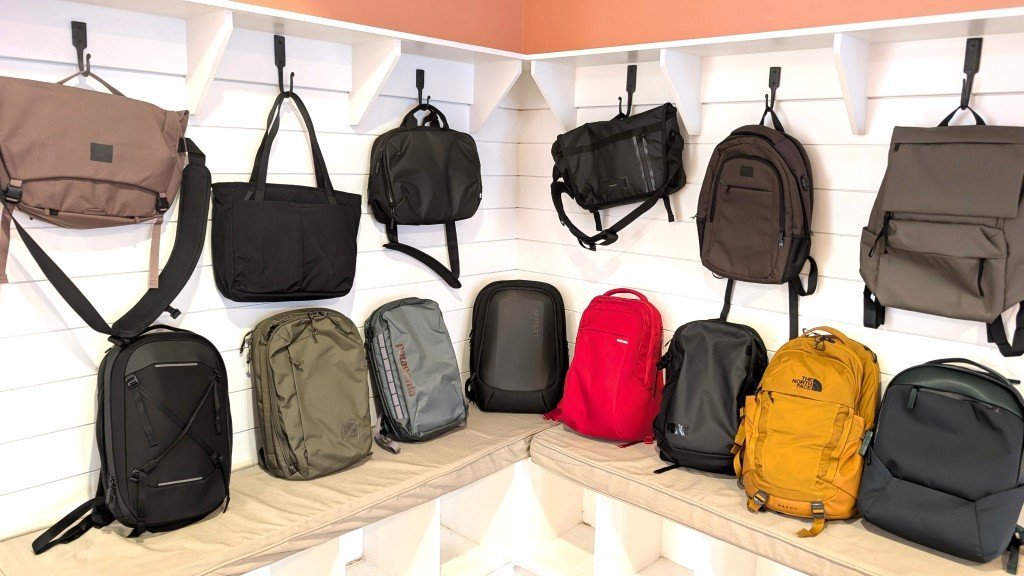
- Measure your laptop’s length, width, and thickness to ensure the internal sleeve provides at least 0.5 inches of clearance on all sides.
- Verify the bag has a suspended laptop sleeve design where the pocket doesn’t touch the bottom of the bag, preventing the device from hitting the ground when you set the backpack down.
- Choose a bag with integrated cable management pockets to keep chargers, mice, and external drives from pressing against the laptop’s lid.
- Inspect the zippers for a weather-resistant coating or a flap cover, which keeps moisture out of the main compartment during light rain.
- Test the strap length to ensure the bag sits high on your back; the top of the pack should be near your shoulders, not your lower back.
Tip: If you carry more than 15 pounds of total gear, look for a model with a sternum strap to shift weight from your shoulders to your chest.
Tip: Don’t use a bag with only one main compartment for both your laptop and liquids, as a spilled water bottle will ruin the electronics instantly.
How long it takes
The time needed to properly pack your bag depends on how many accessories you need to organize before heading out.
| Situation | Setup time | What changes it | What to watch for |
|---|---|---|---|
| Minimalist carry | 30 seconds | Fewer loose items | Tangled cables |
| Full office setup | 3 minutes | Multiple peripherals | Overweight straps |
| Travel/Overnight | 5 minutes | Clothing and shoes | Balanced weight |
If it takes longer than five minutes to pack, you’re likely carrying items you don’t need daily; remove non-essential gear to save your back and speed up your morning routine.
How to tell when it’s done
Photo: www.nytimes.com on Google
You know the bag is packed correctly when the laptop slides into its sleeve without resistance and the zippers close without pulling or stretching the fabric. The bag should feel balanced when you lift it by the top handle; if it leans to one side, rearrange your heavier items toward the center of the back panel. This isn’t for people who prefer shoulder bags or messenger styles, as those designs don’t provide the same weight distribution. Finally, check that no sharp objects, like keys or pens, are touching the outer surface of the laptop sleeve.
Mistakes that ruin it
- Overloading the bag: Filling the pack beyond its weight capacity causes the shoulder straps to detach from the seams and ruins the padding. Keep the total weight under 10% of your body weight to avoid long-term back health issues.
- Leaving zippers open: A partially closed zipper allows moisture and dust to enter the laptop compartment, which leads to hardware corrosion over time. Always ensure the zipper is fully closed before you lift the bag by the handle.
- Ignoring the base padding: Using a bag with a thin bottom panel means your laptop absorbs every impact when you drop the bag on a hard floor. If your bag lacks thick base padding, place a folded towel or a dedicated foam insert at the bottom.
Frequently asked questions
Photo: theokrgroup.com on Google
Can I put my laptop in a regular backpack?
No, you shouldn’t use a regular backpack because it lacks the specific impact-resistant padding and suspended sleeve needed to protect sensitive hardware. Without these features, a standard bag exposes your device to direct pressure and shock from every surface you encounter during your daily commute.
How do I know if the bag fits my laptop?
You know the bag fits by comparing the laptop’s exact dimensions against the manufacturer’s internal sleeve measurements. This varies by model — check the label or the product page for the maximum device dimensions, as the screen size in inches doesn’t account for the thickness of the frame.
Is it safe to carry a laptop in the rain?
It’s safe only if your backpack features water-resistant zippers and a high-denier fabric shell designed to repel moisture. If your bag is made of standard cotton, you must use an additional rain cover to prevent water from soaking through to the internal electronics and causing a short circuit.
What happens if the bag is too big?
A bag that’s too big allows your laptop to shift during movement, which increases the risk of the device hitting the sides of the bag. This constant movement can cause scratches to the exterior finish or internal damage to the screen.
How long does a good laptop backpack last?
A high-quality backpack usually lasts three to five years with daily use, depending on the quality of the zippers and the frequency of heavy loads. You’ll know it’s time to replace it when the seams begin to fray or the padding in the shoulder straps starts to flatten.
Final Thoughts
Finding the right bag doesn’t have to be stressful. Once you’ve identified your daily needs, take a moment to visit a local store so you can try a few options on. You’ll quickly see how a comfortable fit makes all the difference when you’re carrying your tech through a busy day.
Related guides