
Buying a purpose-built dual-compartment bag gives you the best backpack that can hold two laptops because separate padded sleeves stop screens from crushing together. A padded slip-sleeve inside your current pack wins only if you need a solution today without buying fresh gear.
How these backpacks hold two laptops
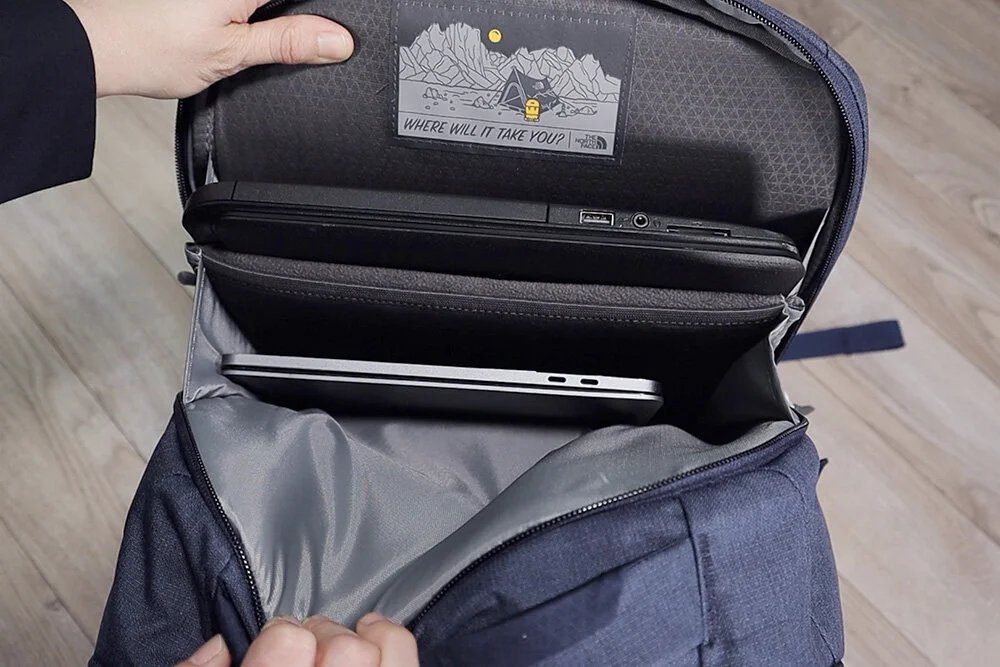
Choosing how to carry two computers comes down to balancing impact protection against your total gear budget.
| Method | How long | Effort | Cost | Best for |
|---|---|---|---|---|
| Dual-Sleeve Pack | Under 2 minutes to pack | Low | High | Daily commuters carrying two large screens |
| Protective Insert Sleeve | 3 to 5 minutes to set up | Medium | Low | Using your existing travel pack |
| Tech Briefcase Hybrid | Under 2 minutes to pack | Medium | Medium | Office workers needing a formal carry |
Dedicated Dual-Sleeve Commuter Bag
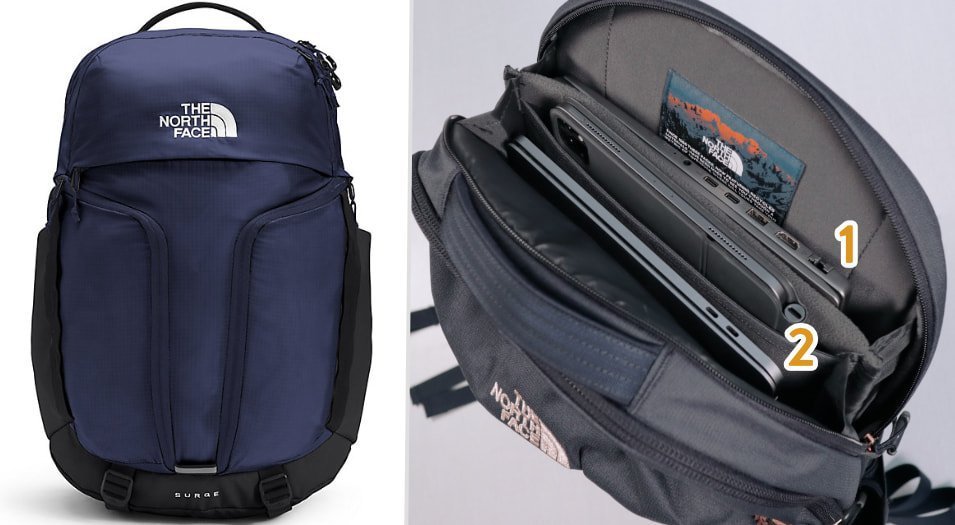
A dual-sleeve bag builds two separate, elevated device bays directly into the back panel of the bag.
- Measure your larger machine across the diagonal screen frame to confirm the main pocket width fits it.
- Slide the heavier laptop into the rear internal pocket so it rests flat against your back.
- Slide your secondary device into the parallel front compartment and zip both compartments shut.
This method gives unmatched impact protection because dedicated dividers prevent surface scratches and spread weight across your spine. Thick padding also keeps corners from hitting the ground when you drop the bag on a floor. Its main downside is dead bulk: empty or full, these bags stay rigid and take up substantial space.
Separate Protective Neoprene Sleeve
Using a standalone neoprene or hardshell sleeve lets you turn any standard daypack into a double-device carrier quickly.
- Buy an external sleeve sized exactly to your smaller laptop’s dimensions so the edges don’t slide around.
- Put your larger machine inside your backpack’s built-in, raised laptop sleeve.
- Zip your second computer into the external sleeve and slide it vertically into the main storage area.
- Pack a soft sweatshirt or thick jacket directly alongside the free sleeve to block any lateral shifts.
This method costs very little and allows you to strip weight out of the bag on days you carry one machine. However, the secondary laptop will lack bottom drop protection unless you remember to stack soft clothing underneath it.
Convertible Three-Way Office Bag
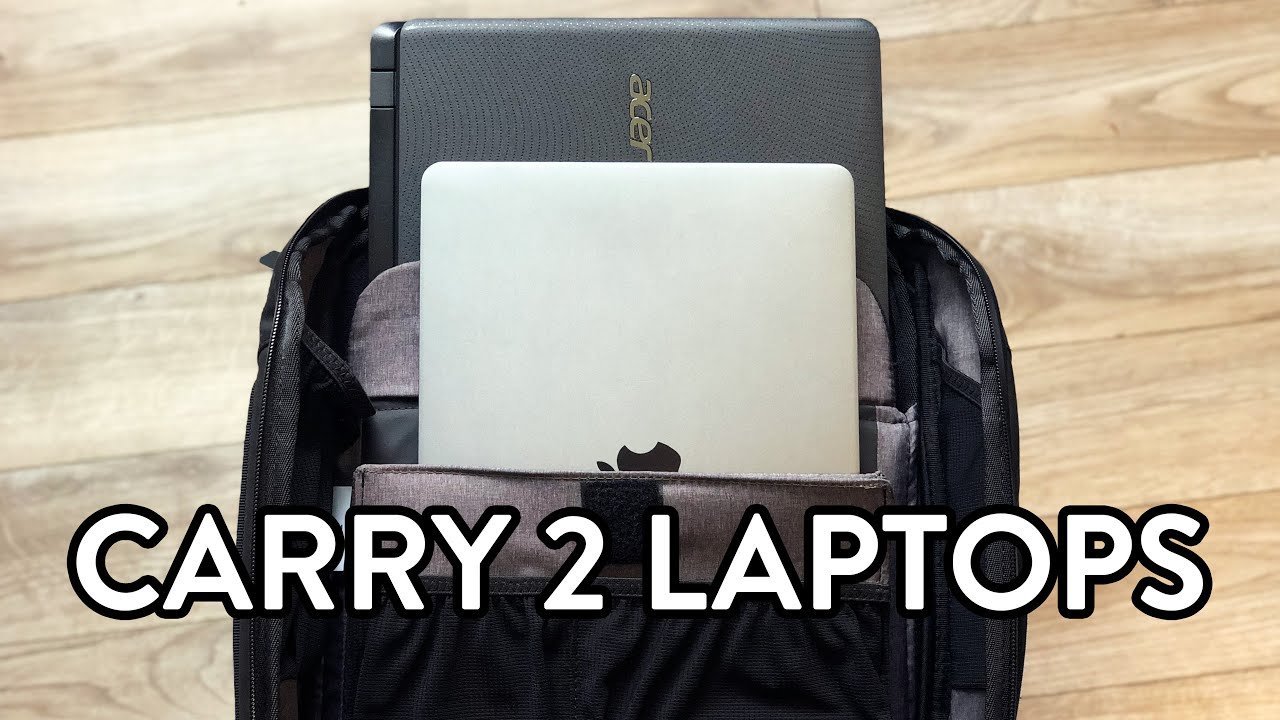
A convertible tech briefcase offers stowable shoulder straps and rigid side walls that support dual computers in both vertical and horizontal positions.
- Unzip the stowable backpack straps from the rear hideaway panel and clip them to the base D-rings.
- Place the primary work computer inside the reinforced center pocket.
- Slide the secondary machine into the padded tablet-or-laptop divider slot located directly opposite.
- Tighten the interior hook-and-loop strap across both devices to lock them together firmly.
This design shifts quickly between client meetings and bike commutes while keeping your chargers organized. Its notable flaw is interior volume: rigid side frames limit spare space for gym clothes or food containers.
Stowing two machines in a single standard laptop pocket without an extra barrier is rarely worth doing. Screen pressure often cracks delicate LCD panels during basic transit, leaving you with steep repair fees.
Which one should you use?
If you’re in a hurry, use an external neoprene sleeve because you can slip it straight into your current daypack without shopping for a whole bag.
If you’re doing this for the first time, get a dedicated dual-sleeve pack because built-in dividers guarantee proper edge spacing without guesswork.
If you want the best possible result whatever it takes, choose a rugged commercial tech pack with suspended compartments, because elevated pockets ensure that neither device ever strikes hard concrete.
The core trade-off centers on mass versus safety: a dedicated bag adds bulk and price upfront, but improvised setups risk expensive hardware damage.
The rules that apply whichever way you choose
Keep the total packed bag under 10% to 15% of your total body weight. This ergonomic guideline from the American Chiropractic Association backpack advice prevents lasting muscle strain and spinal stress.
Before loading anything, shut down both machines entirely rather than using sleep mode to avoid heat buildup. If you carry a heavy gaming rig alongside an ultrabook, place the heaviest computer closest to your back. If both devices share equal weight, balance them centered in the main frame.
Check your bag’s base seams weekly for thread fraying. Always set the pack down gently on flat surfaces rather than dropping it. This varied capacity setup isn’t for hikers walking technical trails where extreme gear mobility matters. Always verify your own machine’s exact dimensions on its spec sheet, as screen sizes don’t match total chassis width.
Frequently asked questions
Can two laptops fit in one standard sleeve?
No. Squeezing two chassis into a single pocket forces the screens to press flat against each other. Carrying them this way leads to cracked glass, rubbed keys, and bent hinges during a regular daily walk.
Is it safe to carry two laptops touching together?
No. Direct metal-to-metal contact causes sharp cosmetic scratches and screen scuffs. Road vibrations grind hard case edges against thin displays, so you should always keep a dense foam barrier between them.
What happens if a laptop backpack gets dropped?
Nothing breaks if the bottom features false-bottom suspension. Cheaper packs let the device edge hit the ground directly, which cracks the chassis corners or disconnects the internal battery and drive connectors instantly.
Why does a dual laptop bag feel so heavy?
Two machines plus their charging bricks usually weigh over eight pounds alone. That concentrated weight sits far away from your center of gravity unless you tighten shoulder straps to hold the load high against your spine.
How long do commuter laptop backpacks typically last?
Between three and five years of regular daily use. The bottom fabric, zipper tracks, and strap anchor points degrade first under the sustained weight of carrying dual workstations every single weekday.
Final Thoughts
Choosing the right bag makes your daily commute much smoother. Before you head to the checkout, check your devices’ dimensions to ensure they’ll fit snugly. You’ll be glad you took that extra moment to measure, as it’s the best way to keep your tech safe while you’re on the move.