
To select the right bag, you must match your device size to a padded sleeve that prevents internal movement while keeping the overall weight under 10% of your body mass. Checking internal dimensions, strap ergonomics, and material durability is the key to choosing a laptop backpack.
Deciding what your laptop backpack needs
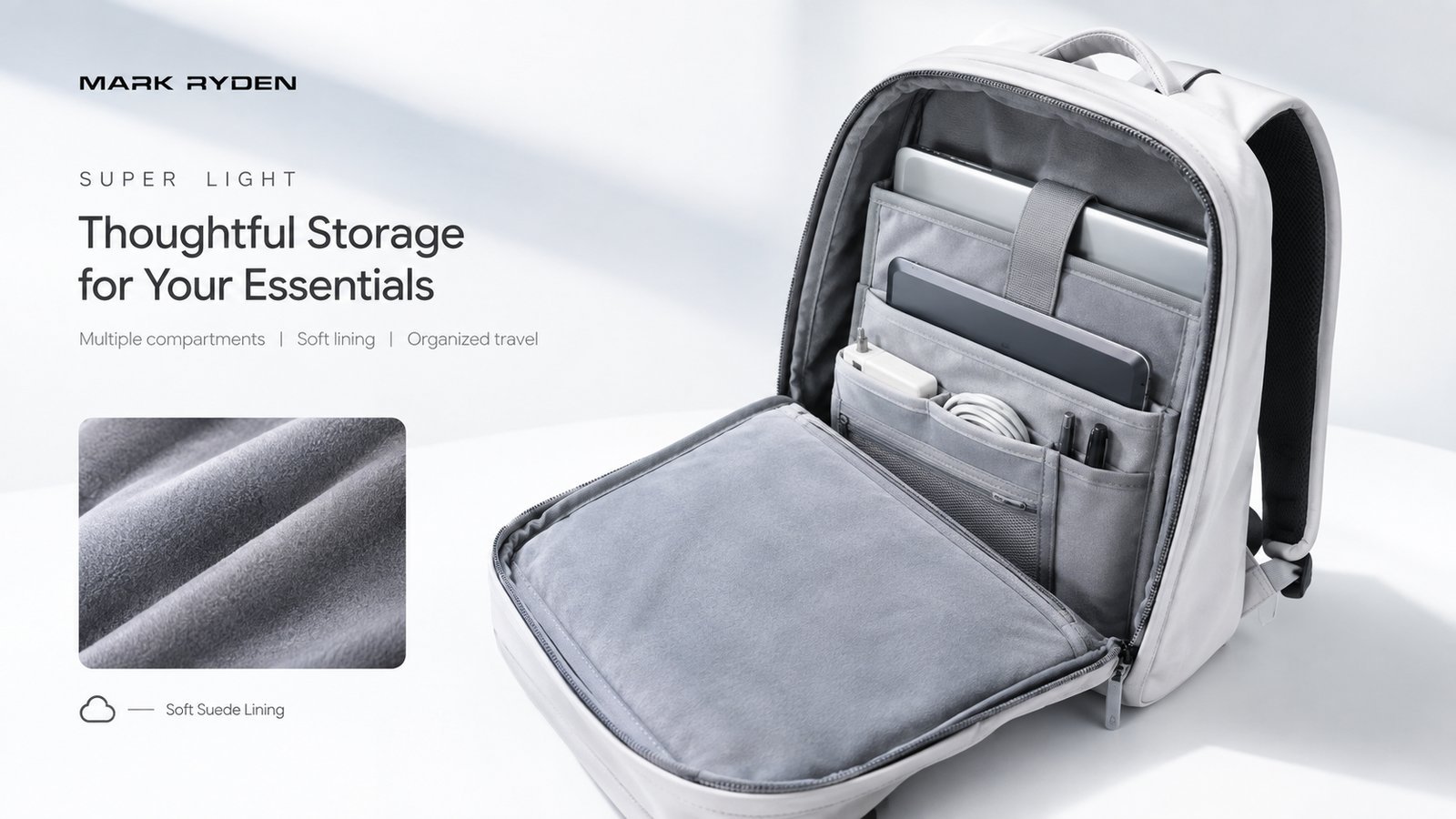
A backpack for your computer isn’t just a container; it’s a shock-absorption system for sensitive electronics. It’s used to protect your hardware during daily commutes or travel. Many people mistakenly believe that any bag with a sleeve is safe, but a sleeve without bottom padding allows your laptop to hit the ground whenever you set the bag down. A true protective compartment sits slightly above the bottom seam to create a “floating” effect. This design ensures that the weight of your device is distributed against your back rather than resting on the hard base of the bag.
The basic method
- Measure your laptop screen diagonally and check the manufacturer’s specific length and width dimensions, as thin-bezel screens fit into smaller bags than older models.
- Select a bag with a dedicated internal sleeve that fits your device snugly to prevent internal movement.
- Check the shoulder straps for at least half an inch of high-density foam padding to prevent strain on your trapezius muscles.
- Test the weight distribution by packing your gear; if the total load exceeds 10% of your body weight, your risk of back pain increases significantly according to the American Occupational Therapy Association.
- Ensure the outer fabric is weather-resistant, such as 600D polyester or nylon, to protect against light rain.
- Verify that the zippers are self-repairing or metal, as plastic teeth often fail under tension.
The critical decision is balancing storage space with physical size; if you carry only a laptop, a slim profile is best, but if you carry peripherals, you need an expandable gusset.
Key numbers and settings at a glance
Choosing the right size depends on your daily load and your frame; always prioritize a fit that keeps the bag centered on your back.
What separates good results from bad ones
Experienced users always pack the heaviest items, like power bricks or hard drives, closest to the back panel. This keeps the center of gravity near your spine and prevents the “pulling back” sensation that leads to poor posture. They also check the bag while wearing their usual coat; a strap that fits perfectly over a t-shirt may be too tight when you’re wearing a winter jacket.
The adjustment phase
Never leave the straps loose. Tighten them so the bag sits high on your back, with the bottom of the bag resting just above your waistline. If the bag hangs below your lower back, it creates unnecessary leverage that strains your lumbar muscles. This varies by model — check the label for weight capacity limits, as overloading a lightweight commuter bag will cause the seams to fail long before the fabric wears out.
Common problems and quick fixes

| What you notice | What it usually means | What to do first |
|---|---|---|
| Shoulder pain | Bag sits too low | Tighten shoulder straps |
| Device slides | Sleeve is too wide | Add a foam spacer |
| Zipper sticks | Debris in teeth | Clean with a soft brush |
| Back sweating | Poor airflow | Use a bag with a ventilated back panel |
Ergonomic and safety standards
Proper use of your gear is vital for long-term health. The American Chiropractic Association recommends that a loaded backpack should never exceed 10% of your body weight. If your gear is heavier than this, you should consider a rolling bag or a bag with a load-bearing waist belt. This prevents the forward-leaning posture that causes chronic neck pain. If you experience persistent numbness or tingling in your arms while carrying your pack, you should consult a physical therapist to evaluate your posture and gear fit.
Maintenance and long-term care
To keep your bag in good shape, wipe the exterior with a damp cloth regularly to remove grit that can wear down zippers. Never machine wash a laptop bag unless the label explicitly says it’s safe; many bags contain internal structural supports that warp permanently in a dryer. If your bag becomes damp, air-dry it completely in a shaded area. This keeps the protective padding firm and prevents the growth of mold within the lining of the computer sleeve.
When to use a different approach
If you work in a professional setting where a backpack looks too casual, swap to a convertible briefcase that hides the straps. If you carry more than 20 pounds of equipment, stop using a standard backpack entirely and move to a rolling case to protect your spine. If you travel through high-theft areas, use a bag with hidden zippers or slash-resistant panels rather than a standard commuter pack.
Frequently asked questions
Can I use a regular backpack for my laptop?
No, regular backpacks lack the suspended, padded sleeve necessary to protect your screen from impact damage when you set the bag down on hard surfaces like concrete or tile floors.
How long should a good laptop backpack last?
A high-quality bag should last through years of daily use, provided you don’t overload the internal seams beyond the manufacturer’s stated weight limit for that model.
Is it safe to carry my laptop in the rain?
No, standard laptop backpacks are water-resistant, not waterproof, so you must use a dedicated rain cover or a dry bag if you’re walking in heavy rain for extended periods.
What happens if I overload my laptop backpack?
Overloading causes the shoulder strap stitching to fail and shifts your center of gravity, which forces you to round your shoulders and creates significant strain on your upper back muscles.
How do I clean my laptop backpack?
You should spot-clean the fabric with a damp cloth and mild soap, as submerging the bag can destroy the rigidity of the back panel and degrade the protective padding inside.
Final Thoughts
Once you’ve found the perfect fit, take a walk around your home with the bag fully loaded to ensure it feels comfortable. Don’t rush the decision; you’ll be carrying this gear for a long time. It’s worth testing a few options before you finally commit to your favorite choice.