
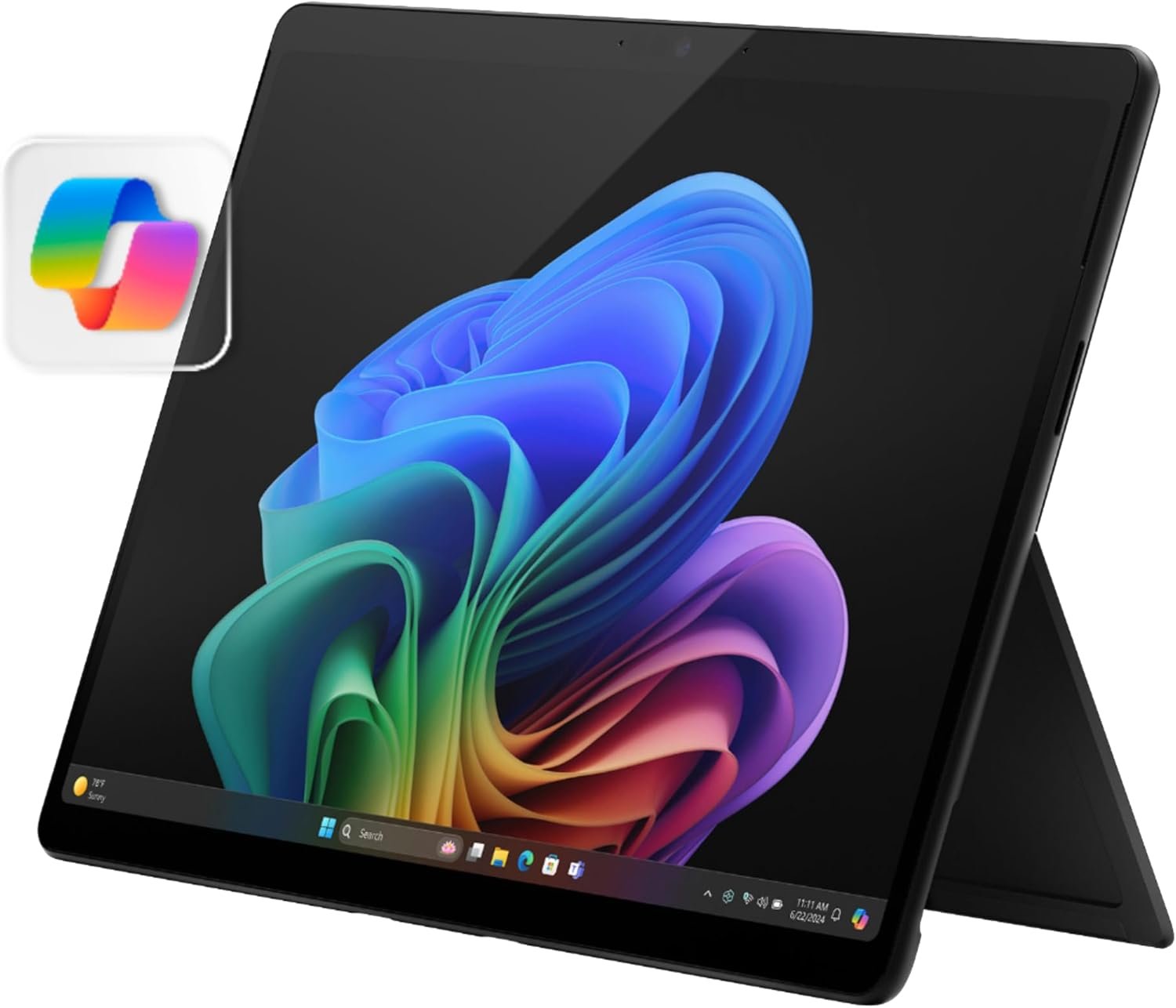
The Microsoft Surface Pro 2-in-1 Laptop/Tablet (2024) is made for people who want one device that can work as both a laptop and a tablet. This Amazon Exclusive model comes with a 13-inch OLED touchscreen, Snapdragon X Elite 12-core processor, 16GB RAM, and 256GB storage.
What stands out most is the mix of power, portability, and screen quality. The Snapdragon X Elite gives it strong performance for daily work, while the OLED display makes movies, photos, and normal Windows tasks look much better.
But there is one thing I would check before buying. This Surface Pro uses an ARM-based Snapdragon chip. Some older Windows apps and special tools may not work the same way as they do on Intel or AMD PCs.
So, is it a good buy?
Yes, if you want a light Windows device for work, school, travel, browsing, streaming, and everyday tasks. But if you depend on older Windows software, check app support first.
Microsoft Surface Pro 2-in-1 Laptop/Tablet (2024) at a Glance
| Feature | Details |
|---|---|
| Brand | Microsoft |
| Model | Surface Pro |
| Model Year | 2024 |
| Operating System | Windows 11 Home |
| PC Type | 2-in-1 Laptop/Tablet |
| Processor | Snapdragon X Elite |
| CPU Cores | 12 |
| RAM | 16GB |
| Storage | 256GB SSD |
| Display | 13-inch OLED touchscreen |
| Resolution | 2560 × 1600 |
| Color | Black |
| Wireless | Wi-Fi 7, Bluetooth |
| Graphics | Integrated |
| Battery | Up to about 14 hours, depending on use |
| Form Factor | Detachable |
| ASIN | B0CXKXNNPX |
My Quick Take
The Microsoft Surface Pro 2-in-1 Laptop/Tablet (2024) feels like a smart choice for someone who does not want to carry both a laptop and a tablet.
The OLED screen is one of its best features. It gives the Surface Pro a rich and sharp look. Touch input also makes Windows feel more natural when the keyboard is removed.
The Snapdragon X Elite is another big upgrade. It gives the device enough power for office work, web browsing, video calls, multitasking, and many creative tasks.
The 16GB of RAM is also a good match for Windows 11. I would rather have 16GB than a lower-memory version if I plan to keep a computer for several years.
The 256GB SSD is the part I would think about more carefully. It is fine for documents, apps, photos, and cloud storage. But people with large video files, games, or big creative projects may want more space.
What I Like About the Surface Pro
1. The 13-Inch OLED Touchscreen Looks Excellent
The display is a major reason to consider this Surface Pro.
It has a 13-inch OLED touchscreen with a 2560 × 1600 resolution. OLED panels can produce deep blacks and strong contrast. That makes videos and photos look more lively.
Text also looks sharp.
For normal work, I like the idea of having a display that can switch between laptop use and tablet use. I can use the keyboard for long writing sessions, then use touch input when I want a more direct way to control Windows.
The screen is also useful for reading. A high-resolution display can make small text easier to view.
For movies, photos, browsing, and general Windows use, this is one of the strongest parts of the device.
2. Snapdragon X Elite Gives It Serious Power
The Snapdragon X Elite 12-core processor is the heart of this Surface Pro.
It is not an old low-power tablet chip. It is designed for modern Windows PCs and combines strong CPU performance with better power efficiency.
That makes the Surface Pro interesting for people who want a thin and portable machine without giving up too much speed.
For everyday work, I would expect it to handle tasks such as:
- Web browsing
- Microsoft Office
- Video calls
- Streaming
- Online meetings
- Document editing
- Light photo work
- Multitasking
- Cloud-based work
- General Windows applications
The 12-core design also gives it room for heavier multitasking.
3. 16GB RAM Is a Good Sweet Spot
The model I am reviewing has 16GB of RAM.
That is a good amount for a modern Windows 11 computer.
I would not want to buy a premium 2-in-1 with very little memory. With 16GB, you can keep several browser tabs and apps open without making the device feel too limited for normal work.
It also makes more sense for long-term use.
If you mainly browse the web, write documents, watch videos, and use office apps, 16GB should be more than enough for a comfortable experience.
4. The 2-in-1 Design Is the Real Advantage
This is not just a laptop with a touchscreen.
The Surface Pro is designed to work as a tablet too.
That gives it a different feel from a standard laptop.
You can use it with a keyboard for work. Then you can remove the keyboard and use the touchscreen more like a tablet.
The built-in kickstand also helps.
This is especially useful when I want a flexible device for different situations. A traditional laptop is great at sitting on a desk. A tablet is easier to hold and use casually.
The Surface Pro tries to give you both.
5. Windows 11 Makes It More Flexible Than a Normal Tablet
One of the biggest benefits is the full Windows 11 experience.
This matters because Windows gives you access to a huge range of desktop apps.
Compared with many tablet platforms, Windows is better suited to traditional computer work.
You can manage files, use desktop programs, connect accessories, browse with multiple windows, and work in a more familiar PC environment.
For people who find tablets too limited but still want a touchscreen device, the Surface Pro makes a lot of sense.
6. Copilot+ PC Features Add Another Layer
This model is part of the Windows 11 Copilot+ PC class.
The Snapdragon X Elite platform includes an NPU for AI-related workloads.
That means the device is designed around Microsoft’s newer Windows AI features.
For many users, the most important benefit is not the AI label itself. It is the combination of AI-ready hardware, strong battery efficiency, and modern Windows features.
I would not buy this Surface Pro only because it says Copilot+ PC.
I would buy it because the hardware already makes sense, and the Copilot+ features are an added benefit.
7. It Is Easy to Carry
Portability is one of the main reasons to choose a Surface Pro.
A detachable Windows computer can be easier to carry than a normal laptop.
It also takes less space in a bag.
That makes it attractive for:
- Students
- Office workers
- Travelers
- Remote workers
- Teachers
- Business users
- People who work in different rooms
- Anyone who dislikes carrying a heavy laptop
If you move around a lot during the day, the 2-in-1 design becomes much more useful.
8. Wi-Fi 7 Is a Nice Future-Proof Feature
This model supports Wi-Fi 7.
That is a nice feature for a new computer.
Of course, the real benefit depends on the router and network you use. A Wi-Fi 7 computer cannot make an older router behave like a Wi-Fi 7 router.
Still, having newer wireless hardware can help make the device more ready for future networks.
Bluetooth support also makes it easy to connect compatible wireless accessories.
9. Battery Life Is One of Its Strong Points
Microsoft lists battery life of up to about 14 hours, although real battery life depends on how the computer is used.
That difference matters.
Screen brightness, Wi-Fi use, video playback, apps, and background tasks can all affect battery life.
Still, the Snapdragon platform is designed with efficiency in mind.
That makes this Surface Pro a good match for people who want to work away from a charger.
For travel and school, this can be a big advantage.
10. The Black Finish Looks Clean
The black version gives the Surface Pro a simple and professional look.
It does not try too hard to stand out.
I think that works well for a business device.
The design is modern without being flashy.
It should also fit easily into an office, classroom, coffee shop, or travel setting.
Surface Pro Performance for Everyday Work
For normal productivity, this Surface Pro has a strong hardware setup.
The Snapdragon X Elite, 16GB RAM, and SSD work together to create a system aimed at fast everyday use.
Here is how I would rate its general use:
| Task | Expected Experience |
|---|---|
| Web browsing | Excellent |
| Microsoft Office | Excellent |
| Excellent | |
| Video calls | Excellent |
| Streaming | Excellent |
| School work | Excellent |
| Business work | Excellent |
| Multitasking | Very good |
| Light photo editing | Very good |
| Heavy video editing | Depends on software |
| Gaming | Limited compared with gaming laptops |
| Older Windows software | Check compatibility |
The last two points are important.
This is not a gaming laptop.
It is also not the best choice for someone who uses unusual older Windows programs without checking ARM compatibility.
The ARM Processor Is the Biggest Thing to Know
This is the most important buying point.
The Snapdragon X Elite uses an ARM architecture.
That is different from the Intel and AMD processors found in many traditional Windows PCs.
Windows can run many applications on ARM devices, and software support has improved. But not every program behaves exactly the same way.
Some older programs may have compatibility problems.
Special drivers can also matter.
Some business tools, older utilities, VPN software, printer software, and niche programs may need extra checking.
So, if your work depends on one or two special Windows applications, I would check those programs before buying.
If most of your work happens in a browser or with modern Windows apps, this concern may be much smaller.
Is 256GB Storage Enough?
The model has 256GB of SSD storage.
For basic work, that can be enough.
For example, you may be fine if you mostly use:
- Microsoft 365
- Web apps
- Cloud storage
- Documents
- Photos
- Streaming services
But 256GB can fill up quickly if you keep lots of large files on the device.
Large videos can take a lot of space.
Games can also take a lot of space.
Creative projects can grow very fast.
So I see 256GB as a good starting point, not a huge amount of storage.
If you already use cloud storage, it becomes easier to live with.
Is the Surface Pro Good for Students?
Yes.
I think the Surface Pro makes a lot of sense for students who want one device for class and home.
The touchscreen is useful for reading and browsing.
Windows is useful for assignments and school software.
The portable design is helpful when moving between classes.
The battery life can also reduce the need to stay close to an outlet.
The main thing to check is whether your school requires any special software that may have ARM compatibility issues.
Is It Good for Business Use?
For many business users, yes.
The combination of Windows 11, 16GB RAM, Snapdragon X Elite, and a portable design makes it a strong productivity machine.
It should be well suited to:
- Word documents
- Excel
- PowerPoint
- Web apps
- Teams meetings
- Business browsing
- Cloud services
- Presentations
- Remote work
But again, business users should check specialized software.
A simple office workflow is very different from an office that depends on old drivers or niche desktop tools.
Is It Good for Creators?
It depends on what you create.
The OLED screen is excellent for visual work.
The high resolution is also useful.
The 16GB RAM helps with multitasking.
But professional creative software can be more demanding.
ARM support is also important.
If your workflow uses software that has been optimized for ARM, the experience can be very good.
If your workflow depends on older software, plug-ins, drivers, or special hardware, compatibility should be checked first.
Is It Good for Gaming?
I would not buy this Surface Pro as a gaming computer.
It is designed around portability and productivity.
The integrated graphics can handle some lighter games and less demanding workloads.
But serious PC gamers will be better served by a dedicated gaming laptop or desktop.
The Surface Pro is about flexibility.
It is not about maximum gaming performance.
Surface Pro 2-in-1 Pros
Pros
- Beautiful 13-inch OLED touchscreen
- Sharp 2560 × 1600 resolution
- Powerful Snapdragon X Elite 12-core processor
- 16GB RAM
- Fast SSD storage
- Full Windows 11 experience
- Copilot+ PC support
- Flexible laptop and tablet design
- Built-in kickstand
- Portable form factor
- Wi-Fi 7 support
- Good battery potential
- Premium-looking black finish
- Great for work, school, travel, and browsing
Surface Pro 2-in-1 Cons
Cons
- 256GB storage may feel small for heavy users
- ARM compatibility can still matter
- Not designed as a serious gaming machine
- Some specialized software may need checking
- Keyboard and other accessories can add to the total cost
- Premium hardware comes at a higher price
- Users who need maximum desktop compatibility may prefer Intel or AMD
Who Should Buy the Microsoft Surface Pro 2-in-1?
I would consider this Surface Pro if you want a computer that can change roles during the day.
It is a strong fit for someone who wants:
- A laptop and tablet in one
- A high-quality OLED screen
- Full Windows 11
- Strong everyday performance
- Good portability
- Long battery potential
- A modern AI-ready PC
- A touchscreen Windows computer
It is especially attractive if you travel often or move between different work spaces.
Who Should Skip It?
I would look at other options if you need:
- Maximum gaming power
- Huge internal storage
- Full compatibility with every old Windows program
- Upgradeable RAM
- A traditional laptop design
- A low-cost computer
The ARM processor is the biggest reason to pause.
If you use specialized software every day, do not assume everything will work exactly like it does on an Intel or AMD computer.
My Verdict
The Microsoft Surface Pro 2-in-1 Laptop/Tablet (2024) is one of the more interesting Windows 2-in-1 designs because it does not force you to choose between a laptop and a tablet.
The 13-inch OLED touchscreen is a major highlight.
The Snapdragon X Elite 12-core processor gives it modern performance.
The 16GB RAM is a strong choice for everyday Windows work.
The 256GB SSD is fine for normal users, but heavy storage users may want more.
The biggest question is the ARM platform.
If your apps are compatible, I think the Surface Pro can be a very enjoyable everyday Windows computer. It is fast, portable, flexible, and easy to use in different ways.
If you depend on older or specialized Windows software, check compatibility before buying.
Overall Rating: 4.5/5
Best for: Students, professionals, travelers, remote workers, and people who want a Windows laptop and tablet in one.
My bottom line: The Surface Pro is a strong premium 2-in-1 with an excellent OLED display and powerful Snapdragon performance. Just make sure your important apps work well on ARM before you make the final decision.
Frequently Asked Questions
Is the Microsoft Surface Pro 2024 a laptop or a tablet?
It can be both. The Surface Pro uses a detachable keyboard design and a built-in kickstand. You can use it as a tablet or attach a keyboard for laptop-style work.
Does the Surface Pro 2024 have an OLED screen?
Yes. This configuration has a 13-inch OLED touchscreen with a 2560 × 1600 resolution.
How much RAM does this Surface Pro have?
This model has 16GB of RAM.
How much storage does it have?
This Amazon Exclusive configuration has a 256GB SSD.
What processor does it use?
It uses the Snapdragon X Elite processor with 12 CPU cores.
Does it run Windows 11?
Yes. This configuration runs Windows 11 Home and is part of Microsoft’s Copilot+ PC lineup.
Is the Surface Pro good for work?
Yes. It is well suited to office work, web browsing, email, documents, meetings, presentations, and other everyday productivity tasks.
Is the Surface Pro good for students?
Yes. Its portable design, touchscreen, Windows software, and strong battery potential make it a useful student computer.
Can I play games on the Surface Pro?
You can play some lighter games, but this is not a dedicated gaming computer. People who want high gaming performance should consider a gaming laptop or desktop instead.
Does the Snapdragon processor run normal Windows apps?
Many Windows apps can run on the Snapdragon platform, but compatibility can vary. Older software, drivers, and specialized programs may have issues. Check important apps before buying.
Is 256GB enough?
It can be enough for basic work, school, browsing, and cloud storage. Heavy users who keep lots of videos, games, or large files may want more storage.
Does it support Wi-Fi 7?
Yes. This model supports Wi-Fi 7.
Is the Microsoft Surface Pro worth buying?
For the right user, yes. The OLED screen, Snapdragon X Elite processor, 16GB RAM, Windows 11, and 2-in-1 design make it a strong premium option. The main thing to consider is ARM software compatibility and the 256GB storage limit.
Final Thoughts
The Microsoft Surface Pro 2-in-1 Laptop/Tablet (2024) is not trying to be just another Windows laptop.
Its biggest strength is flexibility.
You get a touchscreen tablet, a Windows PC, a powerful Snapdragon processor, and a beautiful OLED display in one compact device.
The 16GB RAM is a strong choice. The 256GB storage is practical for many users. The Copilot+ features add modern AI support. And the battery-focused Snapdragon platform makes the device attractive for mobile work.
There are still reasons to think carefully before buying. ARM compatibility is the biggest one. Storage is the other.
But if your software works well on ARM and you want a portable Windows device that can handle both laptop and tablet jobs, the Surface Pro is a very compelling choice.
For students, professionals, travelers, and everyday Windows users, this is a 2-in-1 worth serious consideration.