
A good mouse does not need to be big.
I like a mouse that is small, quiet, and easy to carry. That is where the Logitech POP Mouse, Compact and Portable Wireless Bluetooth Mouse – Lilac gets my attention.
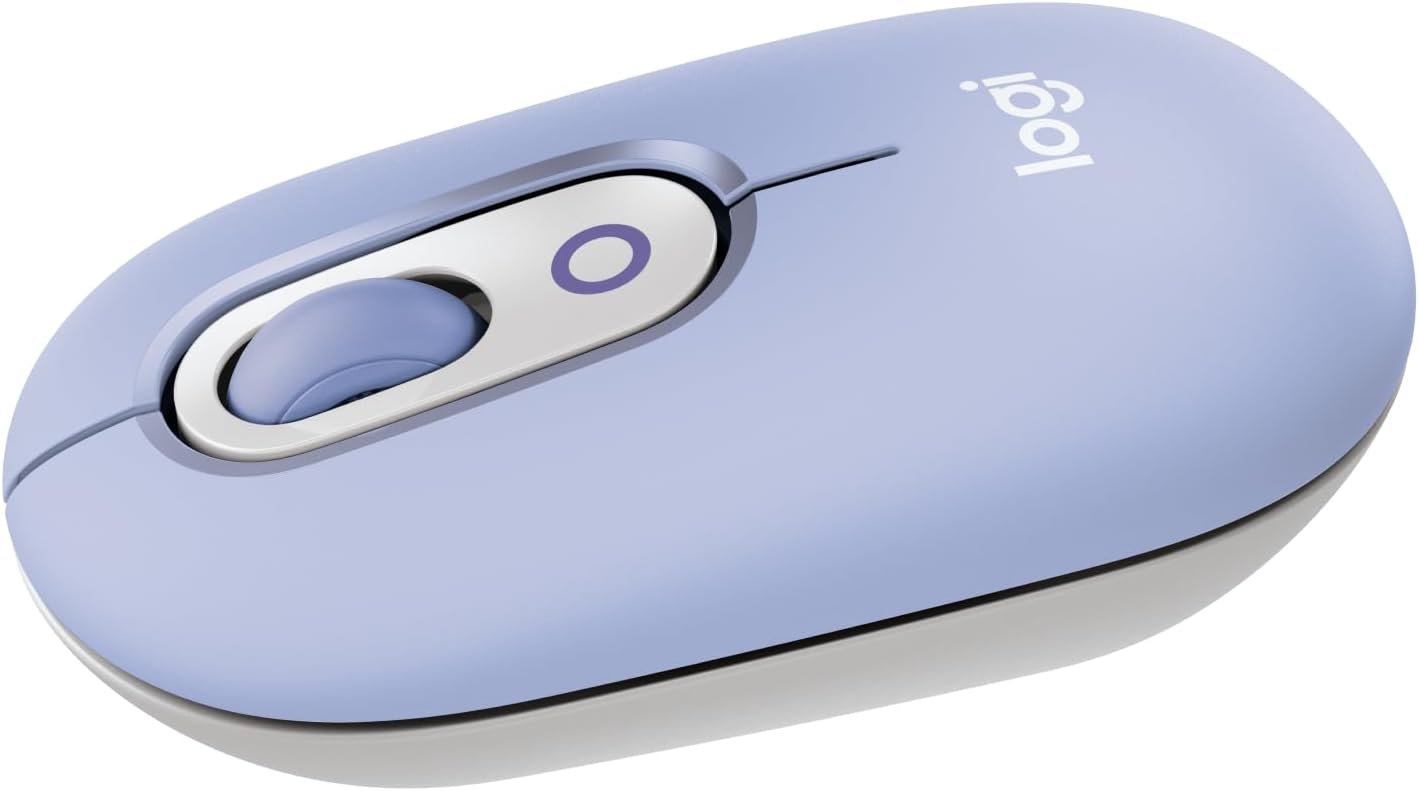
This mouse has a fun Lilac color. It also has a small shape that works well with a laptop or small desk. It uses Bluetooth, so there is no need to keep a USB receiver plugged in.
The Logitech POP Mouse can also connect to up to three devices. You can switch between them with a button. It has quiet clicks, a SmartWheel, and a custom button.
So, is the Logitech POP Mouse worth buying?
Yes, if you want a small wireless mouse for daily work, travel, school, or home use. But its compact size may not suit people who like large mice.
Logitech POP Mouse Review
The Logitech POP Mouse is made for people who want simple wireless control with a little more style.
The Lilac finish is one of its biggest visual draws. It looks different from the usual black or gray mouse. The small body also makes it easy to place beside a laptop.
Its size is about 4.1 inches long, 2.3 inches wide, and 1.4 inches high. It weighs about 82 grams with the battery.
That makes it easy to carry in a laptop bag.
Compact Size
The compact body is one of the main reasons to choose this mouse.
It does not take much desk space. It can also fit into a small computer bag without adding much weight.
This is useful for students and people who move between home, school, and work.
The shape is curved enough to rest in the palm. Still, people with large hands may prefer a bigger mouse for long work sessions.
Quiet Clicks
The Logitech POP Mouse uses SilentTouch technology.
The left and right clicks are much quieter than many basic mice. This can be helpful in a shared office, library, bedroom, or quiet home.
I think quiet clicks are one of the most useful parts of this mouse.
You can work without creating much clicking noise.
SmartWheel
The scroll wheel is not just a basic wheel.
The SmartWheel can move between precise scrolling and faster scrolling. This makes it easier to move through long pages or documents.
For short web pages, precise scrolling feels more controlled.
For long pages, the faster mode can save time.
It is a small feature, but it can make daily browsing feel smoother.
Bluetooth Connection
The POP Mouse uses Bluetooth Low Energy technology.
This is a big plus for modern laptops and tablets. You do not need to use a USB port just to connect the mouse.
The mouse can connect to up to three devices.
You can then switch between them using the Easy-Switch button.
This can be handy if you use a laptop, tablet, and another computer during the day.
Customizable Button
The mouse has a top button that can be customized.
With Logitech software on supported Windows and macOS devices, you can use it for emojis or other shortcuts.
For example, you can set the button for a useful task instead of using the default function.
This gives the mouse more value than a basic three-button model.
The software also lets you change some settings to fit your work style.
Battery Life
The Logitech POP Mouse uses one AA battery.
The rated battery life is up to 24 months, though real battery life can vary with use and other conditions.
That is a strong point for a travel mouse.
You do not need to charge it every few days. The mouse also has power-saving features to help reduce battery use.
For someone who does not want another device to charge, this is a nice benefit.
Tracking Performance
The POP Mouse uses high-precision optical tracking.
It has a nominal 1000 DPI setting and supports a range up to 4000 DPI.
For normal work, web browsing, writing, and office tasks, this is more than enough.
It also works well on many everyday desk surfaces.
However, this is not a mouse I would pick as a serious gaming mouse. Its main goal is portability, comfort, and everyday use.
Multi-Device Use
This is one of my favorite features on the POP Mouse.
You can pair it with up to three Bluetooth devices.
That means you can keep the mouse paired with several computers or tablets instead of pairing it again every time.
The Flow feature can also help move text, images, and files between supported computers when the required software is installed.
This makes the POP Mouse more useful for people who multitask.
Compatibility
The Logitech POP Mouse works with many common platforms.
It supports:
- Windows
- macOS
- ChromeOS
- Android
- iPadOS
Some advanced software features are limited to Windows and macOS.
The mouse can also work with a Logi Bolt USB receiver, but the receiver is not included with the mouse.
That is important to know before buying.
Logitech POP Mouse Lilac Features
Here are the main features I would look at before buying:
| Feature | Details |
|---|---|
| Product | Logitech POP Mouse |
| Color | Lilac |
| Connection | Bluetooth Low Energy |
| Devices | Up to 3 |
| Battery | 1 AA battery |
| Battery Life | Up to 24 months |
| Sensor | High Precision Optical Tracking |
| DPI | 1000–4000 DPI range |
| Scroll Wheel | SmartWheel |
| Quiet Clicks | SilentTouch Technology |
| Custom Button | Yes |
| Weight | About 82 g |
| Best Use | Work, school, travel, browsing |
| USB Receiver | Not included |
| Warranty | 2-year limited hardware warranty |
What I Like About the Logitech POP Mouse
Small and Easy to Carry
The compact body is perfect for travel.
It does not take much room in a bag. It also works well on a small desk.
Quiet Operation
The quiet clicks are great for shared spaces.
You can use the mouse while someone else is working or studying nearby.
Three-Device Support
Connecting to three devices adds real value.
It is useful for people who switch between a laptop, tablet, and another computer.
Long Battery Life
The up-to-24-month battery rating means less time spent thinking about batteries.
That is useful for a mouse made for portable use.
Fun Lilac Design
The Lilac color gives it a fresh look.
It is a good choice if you do not want another plain black mouse.
Useful SmartWheel
The SmartWheel works well for both normal and fast scrolling.
It is especially useful when reading long pages.
What I Don’t Like
Small Shape May Not Suit Everyone
The compact body is great for portability.
But users with large hands may want something bigger.
No USB Receiver in the Box
The mouse is ready for Bluetooth use.
But if you prefer a USB receiver, you need to buy a compatible Logi Bolt receiver separately.
Advanced Features Need Software
The custom button becomes more useful with Logitech software.
Some people may not want to install extra software just to change mouse settings.
Not Made for Serious Gaming
This mouse is aimed at everyday use.
It is not the best pick for competitive gaming or users who need gaming-focused controls.
Logitech POP Mouse Pros and Cons
Pros
- Compact and lightweight design
- Attractive Lilac color
- Bluetooth connection
- Supports up to three devices
- Quiet SilentTouch clicks
- SmartWheel scrolling
- Customizable top button
- Up to 24 months of battery life
- Works with many devices
- Easy to carry
- Good for small desks
Cons
- Small body may feel cramped for large hands
- Uses a replaceable AA battery
- Logi Bolt receiver is sold separately
- Some features need Logitech software
- Not designed as a dedicated gaming mouse
Who Should Buy the Logitech POP Mouse?
I would consider this mouse a good fit for people who want portability first.
It makes sense for:
- Laptop users
- College students
- Remote workers
- Office workers
- Travelers
- Small desk setups
- People who use more than one device
- Users who prefer quiet clicks
- People who like colorful accessories
It is also a good choice if you want a mouse that looks different from standard office models.
Who Should Skip It?
The Logitech POP Mouse may not be the right choice for everyone.
I would look elsewhere if you:
- Have very large hands
- Want a full-size ergonomic mouse
- Need a serious gaming mouse
- Want a USB receiver included
- Prefer a rechargeable mouse
- Need many physical buttons
A larger mouse may feel better for long hours of heavy computer work.
Is the Logitech POP Mouse Good for Travel?
Yes.
Travel is one of the areas where the POP Mouse makes the most sense.
It is small and light. It can fit easily beside a laptop in a computer bag.
Bluetooth also helps because it does not require a USB receiver.
The long battery life is another useful travel feature. You do not have to carry a charging cable for the mouse.
Is the Logitech POP Mouse Good for Work?
Yes, for most everyday office work.
The quiet clicks are useful in shared spaces.
The SmartWheel is helpful when reading long documents or web pages. The multi-device feature is also useful if you work with more than one computer.
For basic work, email, browsing, writing, and spreadsheets, the mouse has the features most people need.
Is the Logitech POP Mouse Good for Students?
Yes.
Students often need a mouse that is easy to carry between classes, libraries, dorms, and home.
The POP Mouse is compact enough for a laptop bag.
The quiet clicks are also useful in libraries and other quiet places.
The Lilac color can also make a simple study setup look more personal.
Logitech POP Mouse vs. a Basic Wireless Mouse
A basic wireless mouse can be cheaper and simpler.
But the POP Mouse offers more than basic clicking.
You get Bluetooth, three-device support, quiet clicks, SmartWheel scrolling, and a customizable button.
The main reason to choose the POP Mouse is its mix of portability and extra features.
If you only need simple pointer control, a cheaper mouse may be enough.
Logitech POP Mouse Setup
Setting up the mouse is simple.
First, install the AA battery and turn the mouse on.
Next, open Bluetooth settings on your computer or tablet.
Look for the Logitech POP Mouse.
Select it and complete the pairing process.
If you want to connect another device, use the button on the underside to enter pairing mode.
You can then switch between paired devices when needed.
For extra controls, you can install Logitech Options+ on supported Windows or macOS devices.
Frequently Asked Questions
Is the Logitech POP Mouse Bluetooth?
Yes. The Logitech POP Mouse uses Bluetooth Low Energy for wireless connection.
How many devices can the Logitech POP Mouse connect to?
It can connect to up to three devices.
Does the Logitech POP Mouse come with a battery?
Yes. One AA battery is included.
How long does the Logitech POP Mouse battery last?
The rated battery life is up to 24 months. Actual battery life can vary based on use and other conditions.
Is the Logitech POP Mouse quiet?
Yes. It uses SilentTouch technology to reduce click noise.
Does the Logitech POP Mouse work with Mac?
Yes. It works with supported macOS devices.
Does the Logitech POP Mouse work with Windows?
Yes. It works with Windows 10, Windows 11, and later supported versions.
Can I use the Logitech POP Mouse with an iPad?
Yes. It supports compatible iPadOS devices with Bluetooth.
Does the Logitech POP Mouse work with Android?
Yes. It supports compatible Android devices.
Does the Logitech POP Mouse come with a USB receiver?
No. A Logi Bolt USB receiver is not included in the box.
Can I customize the top button?
Yes. On supported Windows and macOS systems, the top button can be customized through Logitech software.
Is the Logitech POP Mouse good for gaming?
It can handle basic gaming, but it is not designed as a dedicated gaming mouse. Serious gamers may want a mouse made for gaming.
Is the Logitech POP Mouse good for large hands?
It may feel small for users with large hands. Its compact shape is better suited to users who like smaller mice.
What color is this version?
The model in this review is the Lilac version.
Is the Logitech POP Mouse rechargeable?
No. It uses one replaceable AA battery.
Final Verdict
The Logitech POP Mouse, Compact and Portable Wireless Bluetooth Mouse – Lilac is a smart choice if you want a small wireless mouse with useful extras.
Its compact design makes it easy to carry. Bluetooth keeps your laptop ports free. The quiet clicks are useful in shared spaces. The SmartWheel makes scrolling easier, and support for three devices is handy for people who multitask.
I also like that the mouse does more than look colorful. The customizable button gives it extra function, while the long battery life keeps daily use simple.
The biggest concern is the small size. People with large hands may want a bigger mouse. I also would not choose it as my first option for serious gaming.
For everyday work, school, travel, browsing, and small desk setups, though, the POP Mouse is a well-rounded option.
My overall take: If you want a compact, quiet, stylish Bluetooth mouse that can move between three devices, the Lilac Logitech POP Mouse is worth a look.
Rating: 4.5/5
- Design: 4.7/5
- Portability: 4.9/5
- Comfort: 4.2/5
- Connectivity: 4.7/5
- Battery Life: 4.8/5
- Everyday Performance: 4.5/5
- Gaming: 3.5/5