
The Logitech M196 Compact Ambidextrous Bluetooth Wireless Mouse – Rose is made for people who want a simple wireless mouse without a USB receiver. It uses Bluetooth, has a compact body, and works with both left and right hands.
I like the idea behind this mouse because it keeps things simple. There is no dongle to lose. There is no cable on the desk. It also uses one AA battery and can run for up to 12 months, depending on use.
The M196 has three buttons, a 1000 DPI optical sensor, line-by-line scrolling, and a wireless range of up to 10 meters. Its small shape also makes it easy to carry in a laptop bag.
But this is not a gaming mouse. It is built more for work, school, web browsing, and daily computer use.
So, is it a good buy?
Yes, if you want a basic, compact Bluetooth mouse that is easy to carry and simple to use.
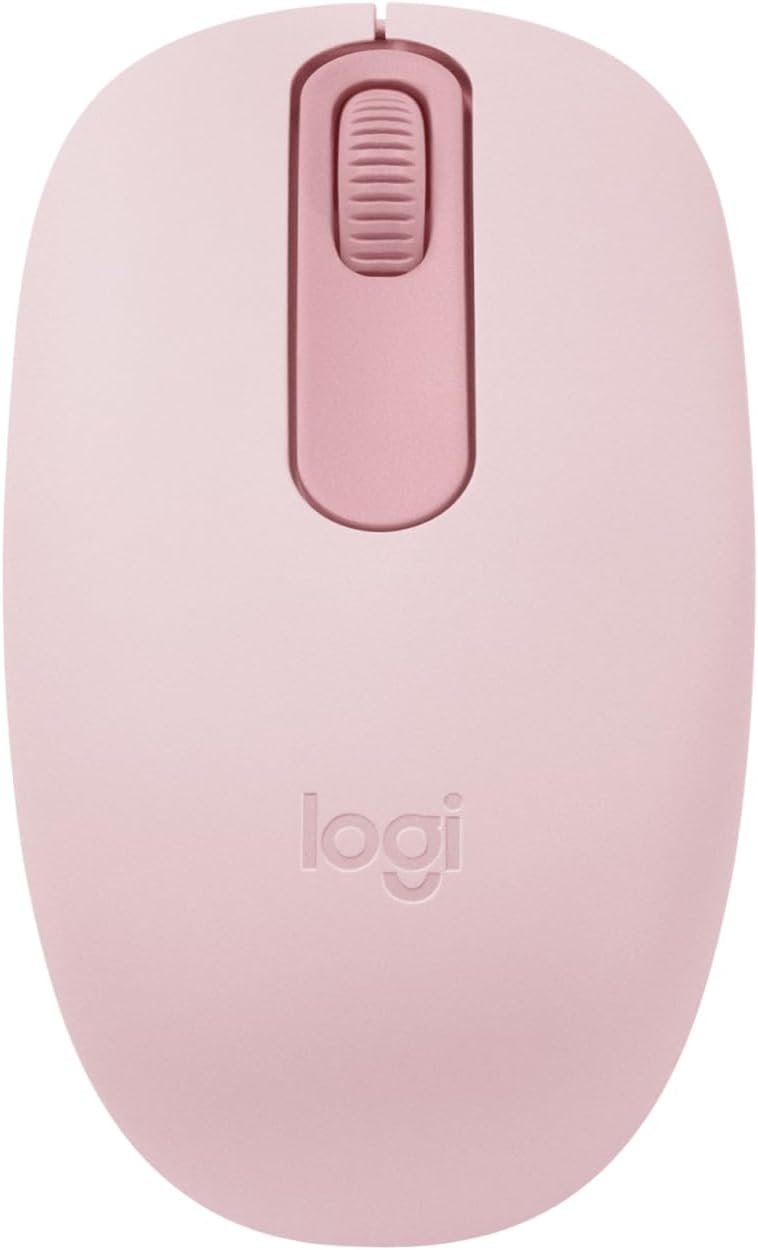
Logitech M196 Rose Review
The Logitech M196 has a very simple design. That is one of its main strengths.
It does not try to add features that most daily users may never need. There are no extra side buttons. There is no RGB lighting. There is no large gaming body.
Instead, Logitech focuses on the basics.
You get left and right click buttons, a scroll wheel, Bluetooth wireless connection, and an optical sensor. That is enough for many common tasks.
The Rose color also gives it a softer and more fun look than a standard black mouse. It can be a nice match for a laptop or desk setup with a lighter style.
Compact Size
The M196 is small and easy to carry.
It measures about 3.9 inches long, 2.36 inches wide, and 1.49 inches deep. It weighs about 2.65 ounces with the battery.
That low weight matters when you travel.
I would pick this type of mouse for a laptop bag, school bag, office drawer, or small desk. It does not take much space.
The compact shape can also be useful if you do not like large mice.
However, people with very large hands may prefer a bigger mouse. A small body can feel less natural for long work sessions if you like to rest your whole palm on the mouse.
Ambidextrous Design
One feature I like about the M196 is its ambidextrous shape.
The mouse is designed for both left-handed and right-handed users. You do not need a special left-hand version.
This makes it a flexible choice for shared workspaces.
If two people use the same computer, either person can use the mouse without changing the setup.
The shape is also fairly neutral. It does not have a strong curve that forces your hand into one position.
That simple shape works well for basic tasks such as:
- Web browsing
- Writing
- School work
- Office work
- Online shopping
- Light photo work
- General computer use
Bluetooth Connection
The wireless connection is one of the biggest reasons to consider the M196.
It connects through Bluetooth Low Energy. You do not need a USB receiver.
That is useful with newer laptops and tablets that have limited USB ports.
The pairing process is also designed to be simple. Once paired, the mouse can connect without needing a receiver plugged into your computer.
The wireless range is up to 10 meters under suitable conditions.
For a normal desk, that is more than enough.
I also like the cleaner desk setup. A Bluetooth mouse means one less cable and one less small USB receiver to manage.
No USB Dongle
This is an important point.
Many wireless mice use a tiny USB receiver. That receiver can be easy to lose. It can also take up a USB port.
The M196 avoids that problem.
If your laptop has only a few ports, Bluetooth can be a better choice.
The trade-off is that your computer must support Bluetooth and mouse devices.
Tracking Performance
The Logitech M196 uses an optical sensor with 1000 DPI tracking.
For normal work, that is enough.
The cursor should feel easy to control for tasks like opening apps, selecting text, clicking buttons, and moving around web pages.
The mouse also supports smooth optical tracking on many common surfaces.
I would not choose it for competitive gaming. A gaming mouse can offer higher sensitivity, faster response features, and more control options.
But that is not what the M196 is trying to be.
For everyday computer use, its tracking setup is simple and practical.
Scroll Wheel
The M196 has a mechanical 2D scroll wheel with line-by-line scrolling.
That makes it useful for reading documents and moving through web pages.
The scroll action is easy to understand because there are no special modes to learn.
You simply move the wheel up or down.
For basic office work, that is all most people need.
If you spend hours working with huge spreadsheets or very long documents, you may prefer a mouse with a more advanced scroll system. The M196 keeps things basic.
Battery Life
Battery life is another strong point.
The M196 uses one AA battery and is rated for up to 12 months of battery life, depending on how you use it.
That is a long time between battery changes.
It also has an auto-sleep feature to help reduce battery use.
For someone who does not want to charge a mouse every few days, this can be a big advantage.
There is also no charging cable to keep on your desk.
The downside is simple: when the battery is empty, you need to replace it.
Some rechargeable Bluetooth mice may be a better fit if you strongly prefer USB charging.
Build and Feel
The M196 has a lightweight plastic body.
The mouse is not designed to feel like a heavy premium mouse. It is designed to stay light and portable.
The plastic parts also include certified post-consumer recycled plastic. Logitech uses recycled plastic in the M196, including a percentage in the Rose version.
That is a nice extra for people who care about product materials.
The light build also makes the mouse easy to move around a desk.
Still, I would not expect the same solid feel as a larger and more expensive mouse.
That is a fair trade for a small and affordable design.
How Comfortable Is the Logitech M196?
Comfort depends a lot on hand size and how you hold a mouse.
For smaller and medium hands, the compact shape can feel easy to manage.
The ambidextrous design also keeps the shape simple. Both left-handed and right-handed users can use it.
For short and medium work sessions, this style makes sense.
For very long daily sessions, comfort may be more personal.
If you like a large palm-rest design, the M196 may feel too small. If you like a lightweight mouse that you can move with your fingertips, it may be a better match.
Logitech M196 for Work
For office work, the M196 covers the basics well.
You can use it for:
- Microsoft Word
- Google Docs
- Web browsing
- Presentations
- File management
- Online meetings
- Light spreadsheet work
The Bluetooth connection keeps your desk clean.
The compact size also makes it useful for people who move between home and office.
I would especially consider it for a laptop setup where space is limited.
Logitech M196 for School
The M196 can also be a good student mouse.
It is small enough for a backpack.
It does not need a USB receiver.
The battery can last for many months.
And the simple three-button layout is easy to understand.
For writing papers, browsing websites, studying, and using school software, you do not need many extra mouse features.
The Rose color is also a nice choice if you want something different from the usual black or gray mouse.
Logitech M196 for Travel
Travel is where the compact design makes the most sense to me.
A full-size mouse can take up more room than you want in a small laptop bag.
The M196 takes less space.
Its wireless design also means there is no mouse cable to pack.
There is no USB receiver to remember.
You can simply pair it with a compatible device and use it.
For frequent laptop users, that can make a real difference.
What I Like About the Logitech M196
The first thing I like is the simple Bluetooth setup.
I also like the small size. It is easy to carry and does not take much room on a desk.
The ambidextrous shape is another plus. It gives both left-handed and right-handed users a similar experience.
The 12-month battery rating is also impressive for a basic mouse.
The Rose finish gives it more personality than a plain office mouse.
Most importantly, the M196 stays focused on everyday use instead of adding features that increase size and complexity.
What I Don’t Like About the Logitech M196
The biggest limitation is the small size.
That can be great for travel, but it may not suit people with large hands.
The three-button design is also very basic.
There are no thumb buttons for back and forward commands.
There is no high-end sensor for serious gaming.
There is no rechargeable battery built into the mouse.
So, if you want a feature-rich mouse, this is probably not the right model.
The M196 is better for people who want simple wireless control.
Logitech M196 Pros and Cons
Pros
- Compact and lightweight design
- Bluetooth wireless connection
- No USB receiver needed
- Ambidextrous shape
- 1000 DPI optical tracking
- Smooth line-by-line scrolling
- Up to 12 months of battery life
- Uses one AA battery
- Auto-sleep feature
- Easy to carry
- Rose color looks stylish
- Good for laptops and small desks
- Made with recycled plastic
Cons
- Small size may not suit large hands
- Only three buttons
- No thumb buttons
- Not designed for serious gaming
- Uses a replaceable AA battery
- No built-in rechargeable battery
- Basic design may feel limited for advanced users
Who Should Buy the Logitech M196?
I think the M196 makes the most sense for people who want a basic wireless mouse.
It is a good match for laptop users, students, office workers, casual users, and travelers.
It is also worth considering if you dislike USB dongles.
The ambidextrous design makes it more flexible for shared computers.
The long battery rating is another reason to consider it if you want low maintenance.
Who Should Skip the Logitech M196?
I would look elsewhere if you need a large ergonomic mouse.
I would also skip it if you need several programmable buttons.
Gamers may want a more advanced sensor and gaming-focused controls.
People who want USB-C charging may also prefer a rechargeable model.
The M196 is a simple mouse. Its limited feature set is part of its design.
Logitech M196 Specifications
| Feature | Details |
|---|---|
| Brand | Logitech |
| Model | M196 |
| Color | Rose |
| Connection | Bluetooth Low Energy |
| Wireless Range | Up to 10 meters |
| Sensor | Optical |
| Tracking | 1000 DPI |
| Buttons | 3 |
| Scrolling | Line-by-line |
| Battery | 1 AA battery |
| Battery Life | Up to 12 months |
| Sleep Mode | Yes |
| Shape | Ambidextrous |
| Height | About 3.9 inches |
| Width | About 2.36 inches |
| Depth | About 1.49 inches |
| Weight | About 2.65 oz with battery |
| USB Receiver | No |
| Best Use | Work, school, travel, and daily use |
Frequently Asked Questions
Is the Logitech M196 a good mouse?
Yes. The Logitech M196 is a good basic mouse for everyday work, school, browsing, and travel. It has Bluetooth, a compact body, and long battery life.
Is the Logitech M196 Bluetooth?
Yes. The M196 uses Bluetooth Low Energy wireless technology. You do not need a USB receiver.
Does the Logitech M196 work with a laptop?
Yes, as long as the laptop supports compatible Bluetooth mouse devices. It works well with Bluetooth-enabled computers and mobile devices that support external mice.
Does the Logitech M196 need a USB dongle?
No. The M196 connects directly through Bluetooth.
How long does the Logitech M196 battery last?
Logitech rates the battery for up to 12 months. Actual battery life can vary based on use and other conditions.
What battery does the Logitech M196 use?
The M196 uses one AA battery.
Is the Logitech M196 rechargeable?
No. It uses a replaceable AA battery rather than a built-in rechargeable battery.
Is the Logitech M196 good for gaming?
It can handle basic casual games, but it is not designed as a gaming mouse. Serious gamers may want a mouse with more buttons, higher-end tracking, and gaming features.
Is the Logitech M196 good for small hands?
Its compact shape can be a good fit for smaller hands. Hand size and grip style will still affect comfort.
Can left-handed people use the Logitech M196?
Yes. The M196 has an ambidextrous design, so it can be used by both left-handed and right-handed users.
How many buttons does the Logitech M196 have?
It has three main controls: left click, right click, and the scroll wheel.
Does the Logitech M196 work without a mouse pad?
The optical sensor is designed to track on many surfaces. Still, a clean, suitable surface can provide a more consistent experience.
Is the Rose version different from other M196 colors?
The main mouse design and core features are the same. The Rose version mainly gives you a different exterior color.
Final Verdict
The Logitech M196 Compact Ambidextrous Bluetooth Wireless Mouse – Rose is a simple mouse with a clear purpose.
It is compact.
It is lightweight.
It connects through Bluetooth.
It does not need a USB receiver.
It can run for up to 12 months on one AA battery.
The ambidextrous shape also makes it useful for both left-handed and right-handed users.
I would choose the M196 for everyday laptop work, school, office tasks, browsing, and travel.
I would not choose it for serious gaming or if I wanted a large ergonomic mouse with many extra buttons.
For someone who wants a small, simple, and low-maintenance Bluetooth mouse, the M196 is a practical option.
My final take: The Logitech M196 Rose is best for users who value portability, easy Bluetooth connection, simple controls, and long battery life over advanced features.