
If your phone videos look shaky, the DJI Osmo Mobile 6 Gimbal Stabilizer for Smartphones is worth a close look. It is made for people who want smoother videos without carrying a large camera setup.
This gimbal has 3-axis stabilization, a built-in extension rod, subject tracking, a foldable body, and a magnetic phone clamp. It also works with the DJI Mimo app for extra shooting tools.
The big question is simple.
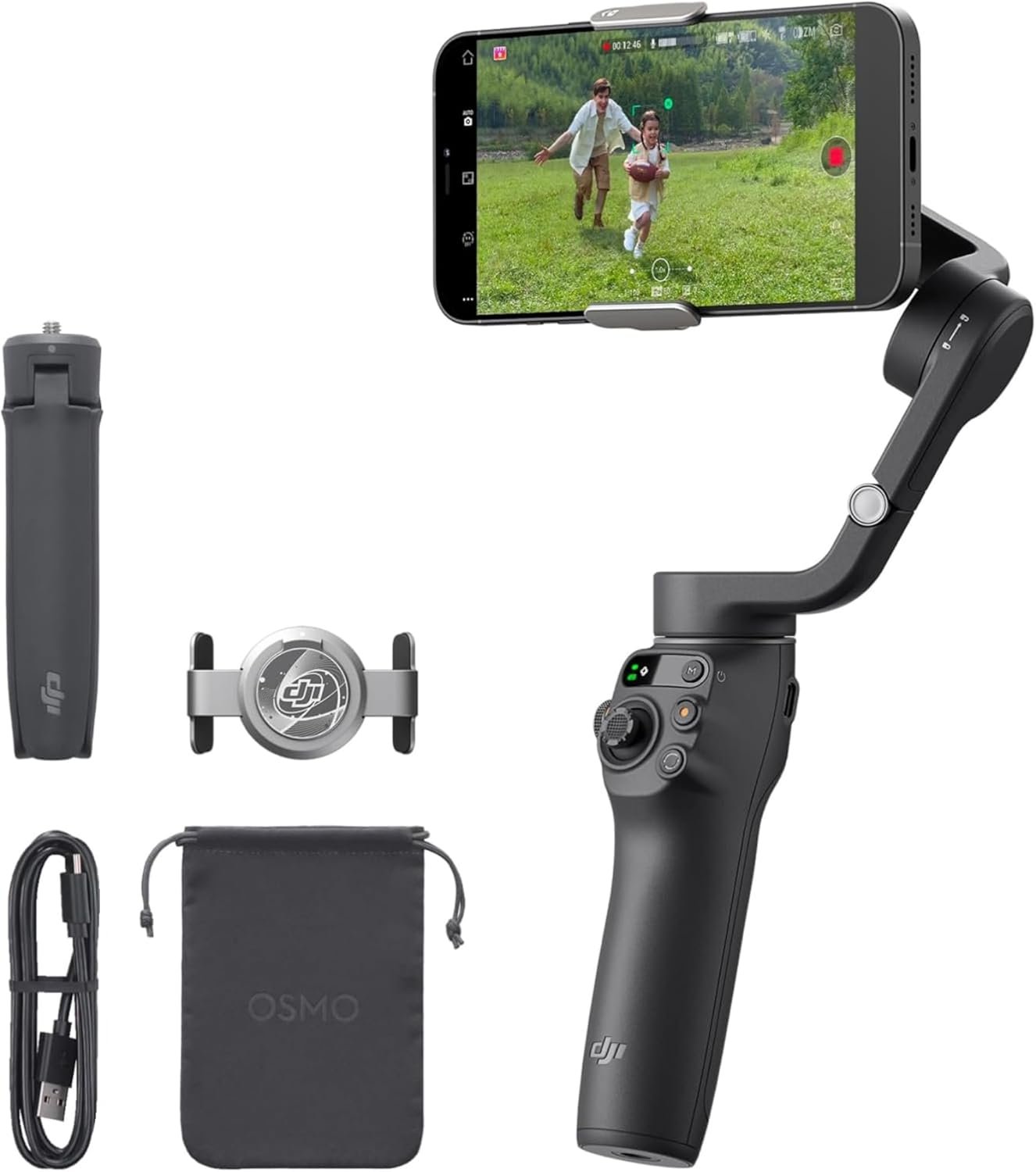
Is the DJI Osmo Mobile 6 still a good phone gimbal for YouTube, TikTok, vlogging, travel, and daily videos?
After looking at its features, design, limits, and user feedback, I think it is still a strong choice for many phone creators. It is not perfect, though. There are a few things you should know before buying it.
DJI Osmo Mobile 6 Gimbal Stabilizer Review
The DJI Osmo Mobile 6 is a smartphone gimbal built to make phone video smoother and easier to control.
Its main job is simple. It helps reduce unwanted phone movement while you walk, pan, follow a person, or record yourself.
The 3-axis system is the main reason to buy it.
A phone can produce good video on its own. But walking with a phone can still create small shakes. A gimbal helps make those movements look much smoother.
The Osmo Mobile 6 also has a compact design. It folds down when you are not using it. This makes it easier to carry in a bag.
I also like the built-in extension rod. You do not need to carry a separate selfie stick for wider shots.
The gimbal can also track a moving subject with ActiveTrack. This can be useful for solo creators who need to stay in the frame while moving.
For someone making YouTube videos, TikTok clips, travel videos, or simple family videos, these features can make phone shooting much easier.
What I Like About the DJI Osmo Mobile 6
1. Smooth 3-Axis Stabilization
The main reason to get this gimbal is stabilization.
The Osmo Mobile 6 uses a 3-axis system to help keep your phone steady. This is useful when walking or moving the camera from one side to another.
It can make handheld phone footage look more controlled.
This is especially helpful for travel videos.
You can walk through a street, move around a room, or follow someone without relying only on your hands to keep the phone steady.
The gimbal also gives you more control over camera movement.
That makes it useful for both simple clips and more creative shots.
2. Built-In Extension Rod
The built-in extension rod is one of the best features here.
It can extend up to about 215 mm.
That gives you more room for creative angles.
You can hold the phone farther away for a wider selfie. You can also use a lower angle without bending down as much.
For vlogging, this can be very useful.
I like this idea because the extension rod is already part of the gimbal. There is no need to carry a separate stick.
It also keeps the setup simple.
3. ActiveTrack Subject Tracking
The DJI Osmo Mobile 6 supports ActiveTrack for subject tracking through the DJI Mimo system.
This is useful when you are recording yourself.
For example, you can place the gimbal on a tripod and move around while the gimbal works to keep you in the frame.
It can also help when filming another person.
This is a useful feature for YouTube creators, TikTok users, dancers, teachers, fitness creators, and anyone who records alone.
Tracking is not magic, though.
Very fast movement, blocked subjects, poor lighting, or busy scenes can still affect tracking.
So I would treat ActiveTrack as a helpful tool, not a perfect replacement for a camera operator.
4. Compact and Foldable Design
The Osmo Mobile 6 folds down to a small size.
That matters when you travel.
A large camera rig can be annoying to carry. A phone gimbal is much easier to take with you.
The folded size is about 189 × 84.5 × 44 mm.
The gimbal itself weighs around 305 grams.
That is not ultra-light, but it is still reasonable for a motorized phone gimbal.
The folding design also makes storage easier.
You can keep it in a backpack, camera bag, or drawer without taking up much room.
5. Magnetic Phone Clamp
The magnetic clamp makes phone setup faster.
You attach the clamp to your phone and connect it to the gimbal.
This is much more convenient than dealing with a large camera mount.
DJI also says the phone can stay in its case when using the magnetic clamp, as long as the case and phone setup are compatible.
That can save time.
You do not want to remove your phone case every time you want to record a short video.
6. Useful Controls
The Osmo Mobile 6 has several controls built into the handle.
There is a joystick for manual movement.
There are also buttons for recording and switching functions.
The side wheel can be used for zoom and focus on supported phones.
This is a nice touch.
It means you do not always need to touch the phone screen while recording.
That can make camera movement feel more natural.
7. Good Choice for Vlogging
The Osmo Mobile 6 makes sense for vloggers.
The extension rod helps with selfie shots.
The gimbal helps smooth walking footage.
The tracking feature can help when recording yourself.
The foldable body makes it easier to carry.
These features work well together.
Instead of carrying a phone, selfie stick, and separate stabilizer, you can use one device for several jobs.
DJI Osmo Mobile 6 for YouTube
The Osmo Mobile 6 can be a useful tool for YouTube creators.
It is especially good for creators who use a smartphone as their main camera.
Walking videos are one area where it can help a lot.
A normal phone can record good video, but movement can still look shaky. A gimbal gives you better control.
The extension rod is also useful for talking-head videos when you want a wider view.
You can place the gimbal on its tripod and record yourself from a distance.
For small creators, this can be a simple setup.
You do not need a large camera or complicated rig to start making better videos.
DJI Osmo Mobile 6 for TikTok
TikTok creators can also get good use from this gimbal.
The phone can be used in portrait mode.
That is important for short-form video.
The gimbal can help with smooth movement, walking clips, transitions, dance videos, product videos, and more.
The tracking feature is also useful for creators who move around while recording.
For simple TikTok work, the Osmo Mobile 6 may be more than you need.
But if you make videos often, the extra control can be worth it.
DJI Osmo Mobile 6 for Travel
This is one of the areas where I think the Osmo Mobile 6 makes the most sense.
Travel videos often involve a lot of walking.
That is exactly where a phone gimbal can help.
You can fold it when you are walking between locations.
Then you can unfold it when you find something worth recording.
The built-in extension rod is also handy for selfies and wider travel shots.
The downside is that it adds weight to your travel bag.
If you only take a few photos, you may not need it.
But if you record lots of video, it can be a useful travel tool.
DJI Mimo App
The DJI Mimo app adds more features to the gimbal.
It supports different shooting modes and creative tools.
There are also guided features that can help new users learn different shots.
For beginners, this is useful.
You do not have to know every camera technique before using the gimbal.
The app can help you explore different options.
However, app support can vary by phone and operating system.
So I would always check your exact phone model before buying.
Battery Life
The Osmo Mobile 6 uses a 1,000 mAh battery.
DJI rates the operating time at about 6 hours and 24 minutes under ideal conditions with the gimbal properly balanced.
That is enough for many short filming sessions.
You probably will not record continuously for six hours.
Real use can also vary.
Battery life can change based on how much you use the motors, tracking, and other features.
Charging takes about 1 hour and 24 minutes under DJI’s stated charging conditions.
It uses USB-C for charging.
That is convenient because USB-C cables are common.
Phone Compatibility
This is something you should check before buying.
The Osmo Mobile 6 supports phones within certain size and weight limits.
DJI lists compatible phone weight at about 170 to 290 grams.
Compatible phone width is about 67 to 84 mm.
Phone thickness is about 6.9 to 10 mm.
That means not every phone and case combination will work perfectly.
Large phones with heavy cases may be close to the limit.
I would check your phone size and weight before purchasing.
This is especially important if you use a large flagship phone.
Is the DJI Osmo Mobile 6 Easy to Use?
Yes, for most people.
The basic idea is simple.
Attach the phone.
Connect it.
Balance the setup.
Turn on the gimbal.
Then start recording.
The magnetic clamp makes the physical setup easier.
The controls are also fairly straightforward.
The gimbal has a status panel that shows useful information and shooting modes.
The M button can also be used to switch between gimbal modes.
Beginners may need some time to learn all the controls.
But you do not need to master every feature to get value from the gimbal.
DJI Osmo Mobile 6 Design and Build
The Slate Gray finish gives the gimbal a clean look.
The body feels designed for regular use.
The handle has a grip that makes it easier to hold.
The folding parts are useful for storage.
There is also a standard 1/4-inch mounting point.
That allows you to use a tripod or compatible accessory.
The included grip tripod can also help when you want to record without holding the gimbal.
Overall, the design is focused on portability and easy phone shooting.
What I Don’t Like About the DJI Osmo Mobile 6
The Osmo Mobile 6 has several strong points, but it is not perfect.
1. It Is Not the Newest DJI Phone Gimbal
This is an older model in DJI’s phone gimbal line.
Newer products may offer newer tracking systems or other improvements.
That does not make the Osmo Mobile 6 bad.
It just means you should compare it with newer options if the latest features matter to you.
2. Tracking Has Limits
ActiveTrack is useful.
But no tracking system works perfectly in every situation.
A person can move behind another object.
A scene can become crowded.
Lighting can change.
The subject can move too fast.
These things can affect tracking.
So I would not buy this gimbal only because of the tracking feature.
The full package is what makes it attractive.
3. The Gimbal Adds Extra Weight
A phone is easy to carry.
A phone plus gimbal is not.
The Osmo Mobile 6 weighs around 305 grams before considering the phone and other accessories.
You will notice the extra weight during long sessions.
For short videos, this is not a big issue.
For long travel days, it can become less comfortable.
4. Some Features Depend on the Phone
Not every feature works the same way with every smartphone.
Some controls and app features can depend on the phone model and operating system.
This is common with smartphone gimbals.
So it is important to check compatibility before buying.
DJI Osmo Mobile 6 Pros and Cons
Pros
- Excellent 3-axis stabilization
- Built-in extension rod
- Compact foldable design
- Magnetic phone clamp
- ActiveTrack subject tracking
- Useful side wheel
- Simple physical controls
- USB-C charging
- Good for YouTube and TikTok
- Helpful for travel videos
- Supports portrait and landscape shooting
- Includes tripod functionality
- Easy to carry compared with larger camera rigs
Cons
- Not the newest model in DJI’s lineup
- Tracking can still lose a subject
- Adds weight to a smartphone setup
- Phone compatibility must be checked
- Some advanced features depend on phone support
- Can be more than casual users need
Who Should Buy the DJI Osmo Mobile 6?
I think this gimbal is a good fit for:
- YouTube creators
- TikTok creators
- Travel vloggers
- Smartphone filmmakers
- Social media creators
- People who record themselves often
- Users who want smoother walking videos
- Beginners who want more control over phone video
It is especially useful if you already use your phone as your main camera.
The gimbal can help you get more from that camera.
Who Should Skip It?
I would skip it if you rarely record video.
If you mostly take photos, the gimbal may sit unused.
I would also think twice if you want the smallest possible travel setup.
A phone alone is much easier to carry.
And if you already own a newer phone gimbal with similar features, upgrading may not make much sense.
DJI Osmo Mobile 6 vs Using a Phone Alone
A phone alone wins for simplicity.
You take it out.
Open the camera.
Record.
That is it.
The Osmo Mobile 6 adds another step.
But you get smoother movement and more control in return.
For casual clips, the phone may be enough.
For regular video work, the gimbal can make a bigger difference.
It really depends on how often you record.
My Take on the DJI Osmo Mobile 6
The DJI Osmo Mobile 6 is a well-rounded phone gimbal.
Its strongest point is not one single feature.
It is the combination.
You get 3-axis stabilization.
You get a built-in extension rod.
You get subject tracking.
You get a foldable body.
You get a magnetic clamp.
You also get useful physical controls.
That makes the gimbal flexible.
It can work for a beginner and still give an experienced creator useful tools.
The main concern is age.
There are newer phone gimbals now.
So I would compare current prices before buying.
If the Osmo Mobile 6 is available at a good price, it can still be a smart buy.
DJI Osmo Mobile 6 FAQ
Is the DJI Osmo Mobile 6 good for beginners?
Yes. The basic controls are simple enough for beginners. You can start with stabilization and basic camera movement, then learn the extra features later.
Does DJI Osmo Mobile 6 track people?
Yes. It supports ActiveTrack through the DJI Mimo system. It can help keep a selected subject in the frame.
Does the DJI Osmo Mobile 6 have a selfie stick?
It has a built-in extension rod. The rod extends to about 215 mm and can be used for wider selfie and vlog shots.
Can I use my phone case with the Osmo Mobile 6?
DJI says a phone case can be used with the magnetic clamp. However, very thick or heavy cases may affect compatibility.
How long does the DJI Osmo Mobile 6 battery last?
DJI rates it for about 6 hours and 24 minutes under ideal test conditions with the gimbal fully balanced.
How long does it take to charge?
DJI lists about 1 hour and 24 minutes when using a 10W USB-C charger under its test conditions.
Is the DJI Osmo Mobile 6 foldable?
Yes. It folds down for easier storage and travel.
Can I use the DJI Osmo Mobile 6 for TikTok?
Yes. It supports portrait shooting and can be useful for TikTok, Reels, Shorts, and other vertical video.
Can I use it for YouTube videos?
Yes. It is a good match for smartphone YouTube videos, especially walking videos, vlogs, travel content, and solo filming.
Does the DJI Osmo Mobile 6 work with Android phones?
Yes, it supports compatible Android phones. However, app features can vary by phone, so check compatibility before buying.
Does it work with iPhone?
Yes. The Osmo Mobile 6 supports compatible iPhone models and offers several features through DJI’s app.
Is the DJI Osmo Mobile 6 heavy?
The gimbal weighs about 305 grams. The phone and clamp add more weight to the complete setup.
Can I mount the Osmo Mobile 6 on a tripod?
Yes. It has a standard 1/4-inch mounting point and can be used with compatible tripod accessories.
Is the DJI Osmo Mobile 6 worth buying?
For many smartphone creators, yes. It offers strong stabilization, tracking, an extension rod, and a compact design. The main thing to consider is its age compared with newer gimbals.
Final Verdict
The DJI Osmo Mobile 6 Gimbal Stabilizer for Smartphones is still a capable tool for smartphone video.
The 3-axis stabilization is its biggest strength.
The built-in extension rod adds more shooting options.
ActiveTrack can help solo creators.
The foldable body makes it easier to carry.
The magnetic clamp makes setup quick.
Together, these features make the Osmo Mobile 6 a useful choice for YouTube, TikTok, travel, vlogging, and everyday video.
It is not the perfect gimbal for everyone.
It adds weight.
Tracking has limits.
Phone compatibility matters.
And newer gimbals may offer newer features.
Still, if you want a proven smartphone gimbal with strong stabilization and useful creator tools, the DJI Osmo Mobile 6 in Slate Gray remains worth considering.
My bottom line: If you find the DJI Osmo Mobile 6 at a good price and your phone is compatible, I think it is a solid choice for smoother and more controlled smartphone videos.
Product: DJI Osmo Mobile 6 Gimbal Stabilizer for Smartphones
ASIN: B0B7XD7R43
Color: Slate Gray
Best for: Vlogging, YouTube, TikTok, travel videos, and smartphone creators
Key features: 3-axis stabilization, ActiveTrack, built-in extension rod, magnetic phone clamp, foldable design, and DJI Mimo support